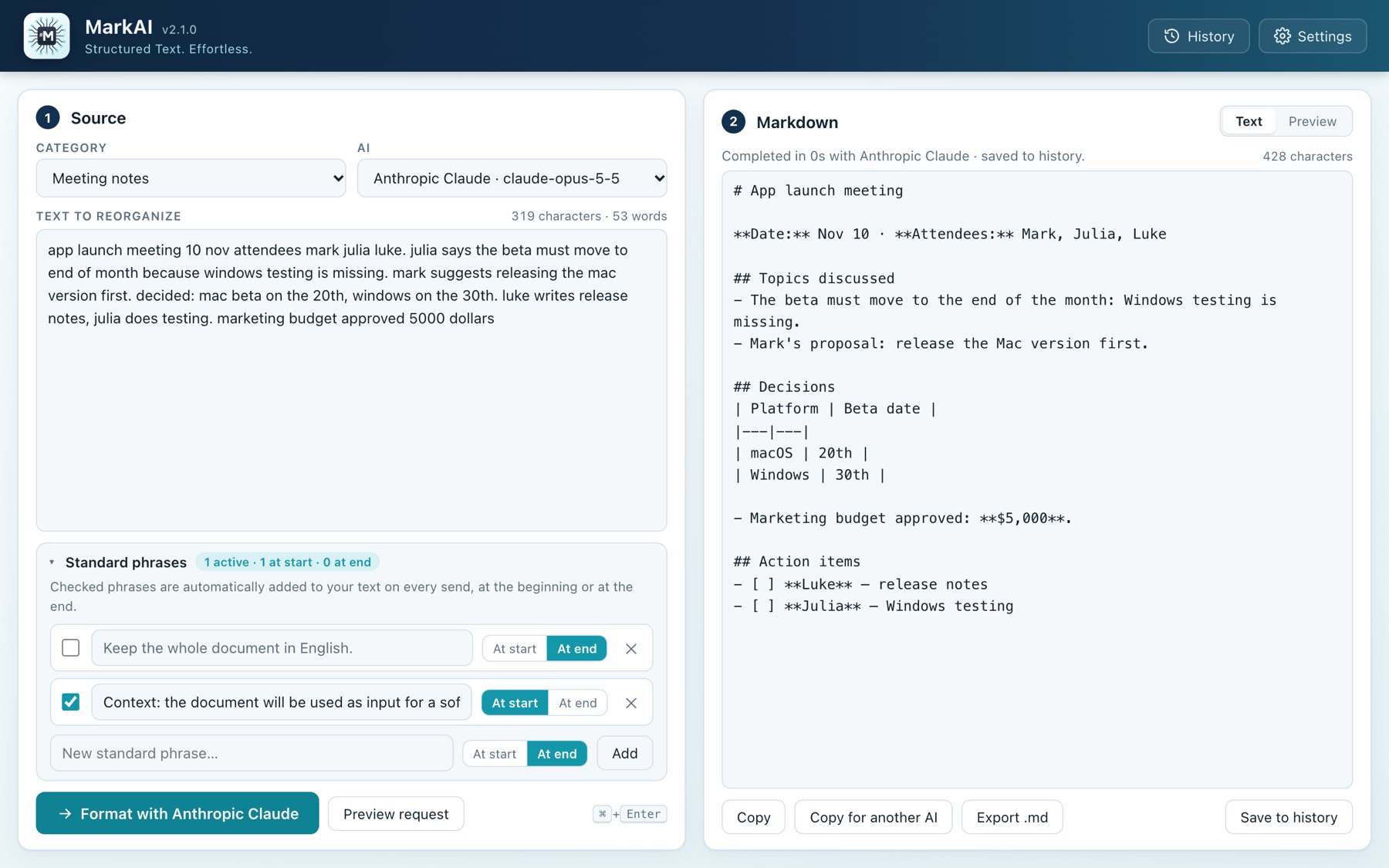
Paste notes, ideas or very long texts: MarkAI reorganizes them into structured Markdown with the AI you prefer, ready for a document or for a second AI agent.

MarkAI talks directly to the official APIs: no browser windows, no website logins.
Meeting notes, specifications, drafts, transcripts: even very long texts.
Technical documentation, app specification, article, email, slides… and the model you prefer.
The result appears in real time while the AI writes, and is saved to history automatically.
Watch the Markdown take shape word by word, and stop whenever you like.
Instructions you always repeat? Check them once and they are added to every request, at the start or at the end.
Each category has its own prompt: edit them, add new ones, adapt them to your work.
Every text sent and received stays available, searchable and exportable as .md.
Switch from raw Markdown to the preview with one click, then copy or export.
"Copy for another AI" adds the right context instruction for your next agent.
Interface, website and manual in 8 languages, translations you can customize with an XML file, and automatic notice of new versions.
Italian, English, French, Spanish, Chinese, Japanese, Arabic (right to left) and Russian. Switch from Settings → Language, no restart needed.
Upload an XML file to add a new language or to fine-tune one of the included ones. Download the official files below and use them as a template.
At startup and once a day MarkAI checks whether a newer version exists and shows you what's new. It sends no data and can be turned off.
Project context, language, tone, format constraints: save the phrases you use often, check the ones you need and choose whether to put them before or after your text. With "Preview request" you see exactly what the AI will receive.
Enter your API key and choose the model. You can also work offline with local models.
Free, lightweight, for every operating system. The website always offers only the latest version.
Macs with Apple and Intel chips · 6.3 MB
Download .dmgOpen the .dmg and drag MarkAI into Applications. On first launch macOS blocks it: see how to unblock it below.
Windows 10 and 11 (64-bit) · 2.6 MB
Download installerRun the installer. If SmartScreen appears: More info › Run anyway.
Ubuntu, Debian, Mint (64-bit) · 3.7 MB
Download .debInstall with sudo apt install ./MarkAI_2.1.0_amd64.deb
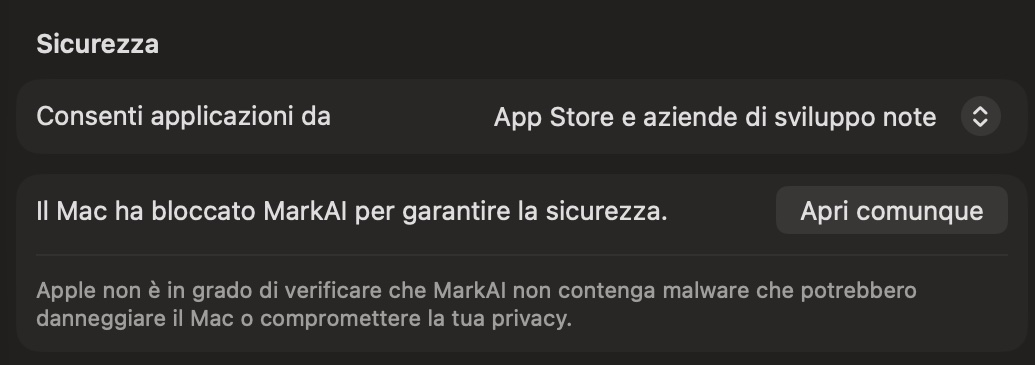
MarkAI is not distributed through the App Store, so on first launch macOS shows "MarkAI was not opened". Click Done (not "Move to Trash") and pick one of the two methods. Since macOS 15 the old "right-click › Open" no longer works.
Method A — System Settings
Method B — Terminal (even if macOS says the app "is damaged"): remove the quarantine attribute with
xattr -dr com.apple.quarantine /Applications/MarkAI.app
If it still won't open, add a local signature:
xattr -cr /Applications/MarkAI.app codesign --force --deep --sign - /Applications/MarkAI.app
The unblock must be repeated after every update.

A complete guide with screenshots of the app:
Choose the manual language:
All the app's texts live in one XML file per language. Download the official files, edit them or create a new one for your language.
<string> tags, without touching the key attributes and placeholders such as {name}.code (e.g. pt), name and, for right-to-left languages, dir="rtl".Missing entries stay in the language given by base (default: English). Using the code of an included language (e.g. fr) you customize only the entries you want to change.
<?xml version="1.0" encoding="UTF-8"?>
<markai-language code="pt" name="Português"
dir="ltr" base="en">
<string key="top.history">Histórico</string>
<string key="top.settings">Configurações</string>
…
</markai-language>
History, categories, phrases and API keys are saved only on your computer.
Your text goes straight to the AI service you choose, and to no one else. The update check only reads the version number from the website.
With Ollama the models run on your PC: no data leaves your machine.